Showing posts with label Blogger Tips. Show all posts

Add Search Bar For Blogger MistyLook

In my previous templetes, there isn't a search bar or navibar on top for people to search through my blog. I was looking at my blog, and wanted to find some old articles that I wrote, I realised that I should have a search area for people to make a search, so it will be easier.


When I changed my templates to MistyLook yesterday, I saw that this MistyLook ported to Blogger version by Blogcrowds is not 100% the same as the one on Wordpress. This Blogger version don't have the search bar on top right corner of the page and the feed icon below the navigation tab area.


I thought of adding the search bar into this template. I copied the search bar code from Wordpress based blog using MistyLook. No luck, I have the search bar on, but I got no result when I search.

So, I added search widget to the sidebar.

From that, I made some tweaks to the search bar above, and it's now working like a charm. Just like the original Wordpress MistyLook theme with the search bar on top.

If you are using the MistyLook Blogger template, then look for this lines (navigation tabs) :
Then add this lines of code after the next tab :
If you are not using MistyLook, you can try too.

For adding Search Widget on the sidebar, just click here and scroll down the page for Search Widget.

In conclusion, a blog should have a search bar so that reader can search through posts they wanted to find easily.

Cool People Do Cool Contest

Seems like everyone starts to have contest in their blog to attract more visitors and make them stay. I need to have a black paper bag to cover my face because I don't have a contest for you guys. I promise I will have one when I make more money online. Don't forget, you can also make money online too.

Hey, don't you making money online now?
Yes I do, with paid post, but I am saving for hosting and domain. So, I can't touch the money first. After the hosting and domain thing settle, I try to save up and get you guys something.

Talking about contest, I noticed that recently, more and more contest appear on many problogger's blog. Make Money Wtih 13 Years Old just ended his contest, John Chow seems like addicted into contest, always have contest for his reader, Blogging Secret and iCalvyn are giving out free domain and many more, I don't remember that much.

I have noticed that their winner of the contest are chosen randomly, lucky draw. You need to be lucky so that you are the chosen one. Besides that, sometimes, you are require to drop a comment to get a ticket, blog about it and get a few tickets, then do something else to get another more tickets. After you got MANY tickets, you will stand higher chance to win or get to join the LUCKY DRAW.

So, I believe having a contest will have more people to post comment, make them stay to see if any other contest coming soon, they will also then blog about your contest at their blog, eventually you get new visitors to join your contest. It's a new way to gain traffic and make your blog more popular. Cheer! Hope you have a contest, very soon! =D
That's a long title. Let's get into the topic. I have just found out why I said my blog still can't "dofollow" with comment. Now it can, 100% do follow now.

The problem is because I uses the iframe comment hack which installed the comment window into the same page of a post with iframe. With that kind of commenting system, even though the nofollow tag is removed, the comment shown in the iframe comment window is still nofollow because that iframe window is actually the popup of the comment window. I remove the "nofollow" tag in my blog, BUT not in the popup window. It's impossible to edit the html code for the popup window.

If without using the iframe hack, your comment will be show on the same page of the post not in the iframe window. So if shown in the same page of the post, the comment will "follow" because "nofollow" tag is removed in my whole blog template.

Now, it's back to the normal comment system which require you to type in a popup window. After submiting your comment, your comment will appear in the post page, then any link in the comment, or link of your name will get a linkback from here.

Still looking a solution to post comment straight from the page without popup so that it will be easier for my lovely readers. But if want to use the previous comment hack, then it will be nofollow, I better choose the hard way so that it benefits you guys.

Let's spam my comment box and get lots of linkback! Just kidding, haha.

What is a Favicon?

If you look at your address bar or at the tab area, you will see a little icon with my initial "N" on it besides my site name/address. That is the favicon.
What is a favicon?
Favicon (pronounced fav-eye-con) is short for 'Favorites Icon.' A Favicon is a multi-resolution image included on nearly all professional developed sites. Within Internet Explorer the Favicon is displayed on the Address line and in the Favorites menu. The Favicon allows the webmaster to further promote their site, and to create a more customized appearance within a visitor's browser. Often, the Favicon reflects the look and feel of the web site or the organization's logo.
iNicholas definition of Favicon : The little icon that locate beside your sitename/address in the web browser.


Having a Favicon looks cool and make your sites more pretty. Besides that, a cool favicon attracts visitors, as it is also a great way to "brand" your blog which give you more recognition in the Internet world and feel professional.

I have found out a cool tutorial that teach you how to add/change favicon to your Blogger blog. Check it out.
Thanks Jack for uploading this great template for blogger. I just change my template to a 3 column template and I love it so much. With 3 column and navigation tab above, it is easy for me to sort things out. The theme is call Garland, original is from Wordpress, then someone coded it into Blogger format. It's hard to find nice template for blogger but easy for Wordpress.


Though, problogger like Kumiko, John Chow uses 2 column blog to make money. They are so pro, but I feel that 3 column will look neater. Unless your blog is clean and less stuff at the sidebar there, then a 3 column template is good for you.


Well, I also added Favicon into this blog. A simple initial of my name "N". By the way, this blog is best viewed in a widescreen resolution.

Do you like my new blog template?

Added Blogrolls

I added Do Follow Blogrolls and Link Exchange Blogrolls into the Link tab above. So if you want to Link Exchange with me, your like will be appear at the Link tab above. As for Do Follow bloggers, you can also find the blogrolls of blogger who has "nofollow" tag remove there.

With a additional page for Links, this will be easy for sorting out and will look tidy on page or else all the Links at the sidebar will be very long and ugly.


I am a bad boy. First, I use the iframe feature for adding the comment window into the same page as a post.

Then I change to HaloScan comment system for it look.


Now, I change back to the first one again. I received an email from Tricia who make the Do Follow blogroll and get to know that HaloScan actually have the "no follow" tag on even you have deleted it in Blogger's HTML page.


That's sucks man. Sorry guys that I told you guys the wrong information. I have deleted the HaloScan commenting system in my blog and installed back the original commenting system in the same page as the post.

Don't worry of the popup comment windows, now you can write your comment in the same page you are reading and besides that, dropping a comment here gets you a linkback. The remove of "no follow" tag works with Blogger commenting system.

Besides remove of "no follow" tag not working in HaloScan, another bad thing about HaloScan is it doesn't tells you which post your reader has comment in. But with Blogger, when someone commented on a post, you will receive an email about which post and what your reader has write a comment on.

HaloScan comment only look nice as it look like commenting in a Wordpress blog. I definitely don't recommend HaloScan to you unless HaloScan improves their feature like removing "no follow", tell you which post you reader has commented in.

How To Put Advertlets Ads Between Post

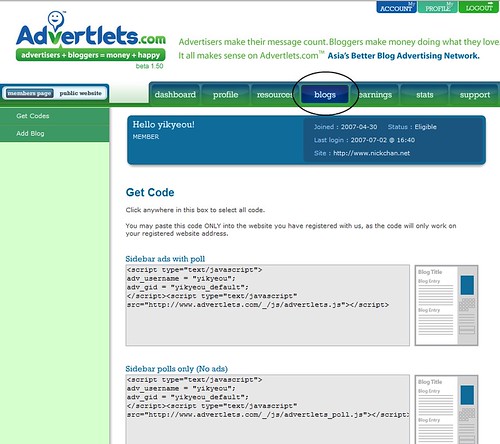
Advertlets is a Malaysia blog advertising network. You place the code in your blog and then you get paid. So where is the ideal place to place your ads? I will say between post. You don't see it here because I am not ready to place the code yet, however I do place it in my personal weblog.

1. First signup/login to Advertlets.

2. Then go to blog tab.


3. Copy the 5th ad format (336 x 280 Banner) code.

4. Login to blogger.

5. Go to your blog Template, then Edit HTML

6. Tick on Expand Widget Templates

7. Look for this code :
<p class="'post-footer-line">

8. Paste the code that you have copied right after the above code.

Walla, you got your Advertlets ads show between your post.

Leave Comments and Get Linkbacks for FREE

I need to create some writer-reader interactions here. So Hi readers, for your information, leaving a comment here benefits you. Why? Because I have "nofollow" tag remove here in this blog - iNicholas.

Basically it works like that, you submit a comment here, at the any link that appear at the comment area like you typed in your blog site or website at the Homepage area or inside the comment box, it will consider a blog reaction in Technorati. Meaning you gain a linkback from here, thus increasing your Technorati Blog Authority, Technorati Rank and Google Pagerank.

This is a win-win situation as I gain interaction between me and my lovely fellow reader while you gain a linkback, you know, it's free to leave a comment here. Hehe.

I believe having "nofollow" tag remove in your blog can attract more reader to leave a comment.

OnlyWire Helps Increase Traffic To Your Site

So how does this works? You first need to sign up for accounts at all of the social bookmarking site listed in OnlyWire. Be patience, take your time and sign up slowly. Then you key in your username and password.

It is because that when you submit a site or post onto Social Bookmarking site like Del.icio.us, Digg and more, people will come and check it out your post. There are many Social Bookmarking site out there but it takes time for you to submit one by one.

So with OnlyWire, you can submit a post to many social bookmarking site with just one click and fast loading. It helps me increase visitor to my blog and I kinda love that service. So it's another method to draw new visitors and share information with other Internet user.

Check it out now. Yay, tomorrow I am going to watch Transfomers. Haha

Make a Contact Form For Your Blog

I realize many problogger's blog have a "Contact Me" link in their site. When you click it, it will bring you to a contact form which allow you to send a message to the owner of the blog.


I think it is a must to have a contact page in your blog so that whenever your reader have question or anything want to talk to you, they can just drop their message at the contact form.


This enable you to stealth your original email address and also speed up time. As to me, whenever I click an email link, my Microsoft Outlook will load very slow and make my computer laggy.


For Blogger user, there isn't a contact page for blogger. What you can do is sign up for Contactify which creates a contact page for you. When you click on the Email Me at the navigation area above, it will bring you to a new page which allows you to type in your message then send to me.

So if you got any question, you can just email me and I hope I can help you. =]

How to Remove Nofollow Tag and Do Follow Plugins

Today I talk a lot about nofollow, haha. I found a ULTIMATE list on how to remove "nofollow" tags and dofollow plugins for your blog. A wide range of blog platform supported.

Thanks Andy for writing up this.

I just made some tweaks to my blog and now my blog follow you. You can get a linkback when you drop me a comment. =]


Almost all blog platforms by default have nofollow tag. No Follow is probably to fight spam as when you post a link on a comment area where that blog have No Follow, your link will not count as a linkback from that blog. Thus, does not increase Technorati Authority.

Benefits :
If remove the "nofollow" tag from your blog, whenever someone write a comment, he or she gets a linkback from this blog. It's also a win-win situation as this encourage reader to drop me a comment and he gets a linkback, which then increase Pagerank and Technorati rank.

Read here on how to remove "nofollow" tag on your blog.


After removing "nofollow" tag, your blog is now "Do Follow". ^^

Join Do Follow blog community at BumpZee now!
Yesterday I wrote about writing comment in the same page for blogger blog which is intergrating iframe for comment window in a the same page of a blog post. I now found out a new way to make your commenting system looks like Wordpress commenting system which doesn't requires iframe and you can just type your comment in the comment form.


You can now do this easily with Haloscan. Sign up an account at Haloscan and then click install at the submenu. Choose the blog service you use which is Blogger (New Version) then follow instruction on screen, you will have your comment form in your post very soon.

With this, your blog will look more professional and will not annoyed by popup comment.

However, I am still figuring which code to edit because at my homepage, whenever someone click on the comment a popup still appear, I need to link the comment to my post area, anybody know how to?

Comment In The Same Page for Blogger Blog

I need to thank Jack for exploring this feature. Now you can comment within post on a Blogger blog. Usually, when you want to comment in a post, you click on the Post A Comment link then a new window will pop-up or bring you into a new site which is mainly for your comment. This is one of the disadvantage of using FREE Blogger blogging service.

Reader sometimes lazy to click or dislike the popup window, thus you get less feedbacks.

While in Wordpress, user can just simply type in their name, URL and email and message at the comment box which appear in the same page of a post then hit a button, his comment will then appear.

CLICK HERE FOR TUTORIAL

With this tutorial by Jack, you can now post comment within the post page. This uses iframe, so below this post, you will find a little box showing the comment page which should be popup. After posting your comment, you will see it immediately. Isn't that cool?


If you have any problem, you can drop me a message at the comment area or contact me via the contact link tab above.

Review Back

Check this out, I found a new method to make your blog more popular, it's Review Back. I haven't try it yet, but I guess it will help you do more link exchange. As this time, you don't pay for people to review you, it's exchanging blog review for FREE.

The image “http://www.reviewback.com/i/logo.gif” cannot be displayed, because it contains errors.

You register yourself, then submit your blog. Then, look for review to exchange, just like looking for opportunity in PayPerPost. You review someone's blog, then he or she review back. Like this, readers will read the review on your blog and somehow he will click on it, then walla, you will get new reader and gain another link exchange. Like this, it improved your Technorati rank as your link count increases.

I will try it out soon then tell you guys whether it works or not. You guys can try it out too, and if you guys are user or Review Back, please share your experience. Cheer.

Use Google Reader to Read Feeds

I read feeds with Google Reader everyday so I recommend it to you guys. I feel it's better to read feed in browser than in a feed reader software. I've tried a couple of feed reader software, but none of it is nice, the UI sucks and I hate the load time.


Google Reader UI and Expanded Post View.

Why I loves Google Reader?
Google Reader is very easy to use. Just point yourself to Google Reader website and you can start reading the news and also it load very fast and smoothly. It is because that when you sign in to Google account, Google stay you login to it and no need type your username and password again. No double click, everything is done with a click and there is a number beside the title to shows that how many item is new which you haven't read it.


List View, read the title of the post first before going into the post.

Bookmarked Google Reader, put a shortcut on your desktop, so every time you start up your computer or your browser, you can quickly get into Google Reader and enjoy reading the feed you have subscribe.


Bookmarked!

I will soon come up with how to subscribe to feed for newbie and why you should subscribe to feed. :) Cheer. I bet it's easier to read blog via RSS, meaning that reading a blog on feed aggregator like Google Reader.

Go to Google Reader Now.

Boost Your Site Traffic With MyBlogLog

I didn't write a how to boost traffic before. This is one way that I found out how to boost traffic to your blog. Do you ever heard of MyBlogLog? It's a very popular social networking site for blogger. It's like MySpace, Facebook and Friendster. When you view someone's profile or site, eventually the little avatar of you will appear on the widget. Automatically, when the owner saw it, she will click it and definitely she'll check out your blog. It works for me, I tried it and I get some unique visitor to my site. Did I said some? Yes, some only, so I still need to work hard to change some to LOT.


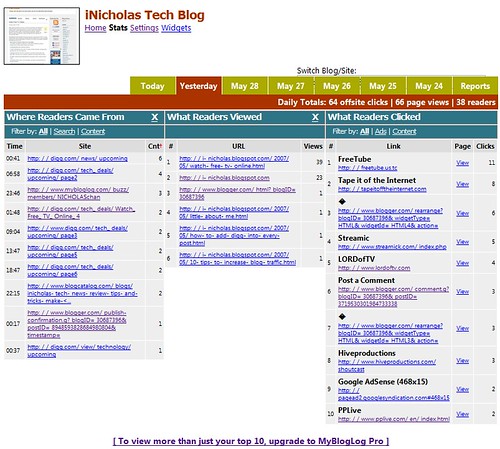
Besides just boosting site traffic, making more visitor to your site, MyBlogLog monitors your blog and tell you about your blog stats of the previous day. But the free account only limited to Top 10 of : What people click? Where do readers come from? and What reader viewed? You have to sign up for MyBlogLog Pro in order to do more that. I don't think it's necessary to spend on this, rather you can use free site monitor tool like Google Webmaster Tools, Stat Counter. I haven't sign up for Stat Counter yet, but my friend recommend it to me. With Google Webmaster Tools, you can check your pagerank, site that link to you in Google and more.


I still don't get a lot of visitor to my site yet, so I am good with just Top 10 stats by MyBlogLog free account.

Boosting traffic and viewing site stats is boring, why not join other people's blog community? And then and meet some new friends, just like Friendster Group :).

Kumiko said that you need to have a catchy and interesting avatar in order to attract people. I don't know about that, maybe I should make a VERY INTERESTING and eye cathing avatar for myself. However, I like my current picture of me posting happily at the hill top of Penang Hill. :D

Happy boosting your traffic, viewing your blog stats and making new friends with MyBlogLog!

If you wish to know more about boosting site traffic, subscribe to my feed to get latest updates. ^^
After doing some research online, I found out that most "How To Make Money Online/SEO" site have their own domain.

However, there are site making money online on a hosted domain ect blogspot.com, wordpress.com, popular site hosted on these free domain are BloggingSecret, How To Make It Work, Digital Inspiration and former Kumiko CashQuest. It doesn't mean that you should not have your own domain. Even Louiss Lim of Blogging Secret and Kumiko of CashQuests said that it's a mistake not having a domain at first. BUT, if your site is as popular as Cashquests, when switching to a new domain from a free domain, you won't be worry of losing your pagerank and Alexa ranking but the problem is on Technorati ranking, Kumiko just changed his domain in this month and just wrote a post on why he loves his new domain. This is because that you need other people to re-link to your new domain.

Why am I not hosted on a domain?
I am trying to make my first $10 with PayPerPost. After they approved my post, and I will have $6 in PayPal. Then, I will buy my domain. I don't have a credit card, my age not eligiable for a credit card and also I have no income. I just bought www.nickchan.net for my personal weblog with my mom's credit card and I don't want to spend 2nd time for it.
Not I don't want to get a domain, I am waiting for my $$$.

Why you should get a domain?
If you use PayPerPost, you'll know that some opportunity (offer) are available for you to write, but not all you can write to earn $$$, some advertiser need your blog to have high page rank etc. page rank 5,6,7, high Alexa rank, and high Technorati rank and lastly, some advertiser only limit their offer to own domain name (*.com, *.net, *.org, [dot]blablabla) but not free domain like (*.wordpress.com, *.blogspot.com, *.blogsome.com, or myspace). If you have your own domain, you get a wide range of opportunity to write and they get paid!
Click Here To Get Paid By Blogging

If you don't have PayPerPost, having own domain is good because it's more easy to tell people your website. Like when you meet someone, you want to tell them your site, you'll say "Hey buddy, check out my site at NICKCHAN DOT NET", if you tell them "Hey buddy, visit my blog at NICKCHAN DOT BLOGSPOT DOT COM", they might remember at first but when they get home, they may forget it and thinking about "Just now what site did he tell me? NICKCHAN DOT WHAT ALREADY ?"

So, get yourself a domain now! =)
1 Domain isn't very expensive, registering your domain at 1&1 is only $5.99 while NAMECHEAP is at $7.98 after key in coupon. I used NAMECHEAP for my nickchan.net.

If you don't like to use Blogger, get yourself a webhosting plan and use Wordpress. The down side for Blogger is the feature is still limited, but there's a lot of hacks and tweak out there. :)

If you like my post, please subscribe to feed for more updates.

10 Tips to Increase Blog Traffic

While I was searching for how to improve SEO, I found 10 tips on how to increase blog traffic by Markus Merz. He make a list of it and he calls it "My cooking recipe for fast SEO results". Here is the list of it :
  1. Clain your blog at blog services like Technorati. Fill in all keywords for every single blog.
  2. Ping your blog using Pingoat or Ping-O-Matic.
  3. User Feedburner for feed publishing
  4. Bookmark every article at del.icio.us.
  5. Use extensive tagging and keywording inside your articles and on services like del.icio.us.
  6. Trackback, if you write about another blog or linking to other blogs.
  7. Use Flickr for your photos. Link to the articles in your Flickr descriptions. Don’t forget to tag your photos.
  8. If using a photo from somebody else (from Flickr or other sources) for one of your articles always ask for permission and after publishing the picture add a comment with a link to your article. It is polite to add the photographer as contact and to make the used picture a personal 'favorite'.
  9. If you are linking to somebody, send them an email about your link. Ask them to inform you if they have something interesting for you to blog about.
  10. Add a link to a keyword in Wikipedia whenever possible.
Happy blogging. If you like my post, please subscribe to feed.

Blogger Template by Blogcrowds